Many loyalty programmes fail for very ordinary reasons. A customer collects points at one branch, goes to another, and the staff tell them the points cannot be used there, or that they need to sign up again. Soon after, the customer loses interest, and the membership card becomes a card that sits in a wallet and never gets picked up.
If your business has several branches, this problem can be solved in the structure, not in the rewards. This article follows the order of the design, using Upsize Loyalty as the example.
Step 1Start with one programme, not one programme per branch
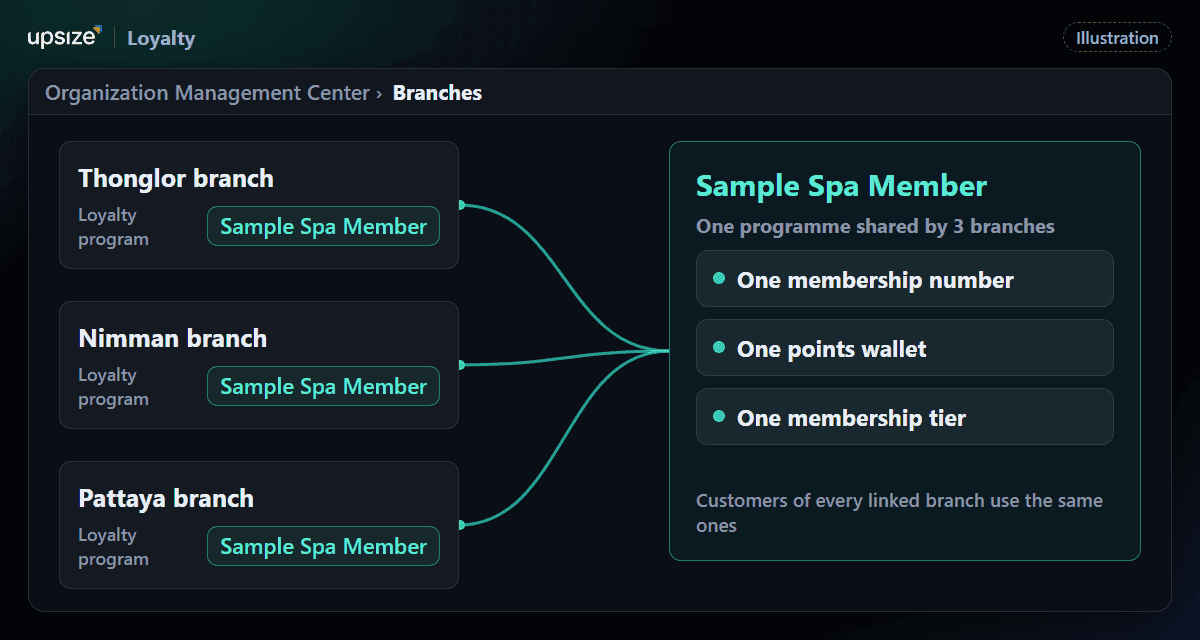
The most important principle is that one customer should have one membership account and one wallet of points, wherever they buy. In Upsize, a single loyalty programme can be shared across several branches. Customers of every branch linked to that programme use the same points wallet, membership tier and membership number. Your team also finds it easier to explain, because the rules are the same everywhere.
Linking a branch to a programme is done in the Organization Management Center, under Branches. Choose "Link or change the loyalty program of this branch", and the system links the sites of the various apps in that branch to the chosen programme at the same time. There are two things to know before you press it:
- If sites in the same branch are linked to different programmes, the system warns you that customers of that branch will collect points separately in two programmes.
- When you move a branch to another programme, the existing points, membership tiers and members stay with the original programme and are not transferred. Customers start collecting in the new programme from then on, so settle the structure before you have a large number of members.
Create a separate programme only when a branch truly needs its own members and points, for example when it is a separate legal entity that does not want to share customers. Branches that need to share points should be linked to the same programme.
Step 2Make the rules explainable in one sentence
Customers should be able to say how they earn points and what they can redeem. If they have to read pages of conditions, most people will not. Start simple and adjust once you see how customers really behave.
Upsize Loyalty lets you choose how customers collect:
- Points. Earned from purchases and visits, used to redeem rewards and to move up membership tiers.
- Stamps. A stamp card: come back the required number of times, then receive a reward.
- Both. Points and stamps are kept separate and can be used together.
You can change the mode later. For service businesses where customers come back in cycles, such as hair salons or cafés, a stamp card is often easier to explain because the remaining spaces are clearly visible. The rules that earn a stamp can be chosen, for example visiting (a Booking appointment is completed), buying at the POS up to a set amount, a staff member stamping it themselves (a reason is required every time), or buying selected services and products that take part in the scheme.
There are rules to guard against mistakes and fraud, such as a daily stamp ceiling, a card validity period counted from the first stamp, and a choice of whether a card that is full starts a new one automatically or ends the programme. One bill or one appointment earns a stamp only once, and when a bill or appointment is cancelled, the stamp is reversed.
Step 3Make the rewards worth wanting
Rewards do not need to be expensive, but they must feel within reach. A first reward that is close enough to earn quickly gives customers a reason to come back. In Upsize Loyalty, rewards live in a single catalogue, used both for redeeming points and as rewards along the way on a stamp card, which are issued as coupons in the customer's membership card. If a reward is given for free at a certain space on the card, you can set the points needed to redeem it to zero.
There are also membership tiers you can define yourself. Each tier can have its own minimum points, points multiplier and colour, so regular customers feel they are looked after differently from new ones. There are also coupons and promotions that customers redeem or keep to use later, and the shop can set how long a coupon is valid after redemption.
At the counter, staff can scan the member code or redeem by code. A manual points adjustment requires a reason, and when it exceeds the limit the owner has set, it must be sent to an approver for review first. This helps guard against mistakes and fraud at the shop.
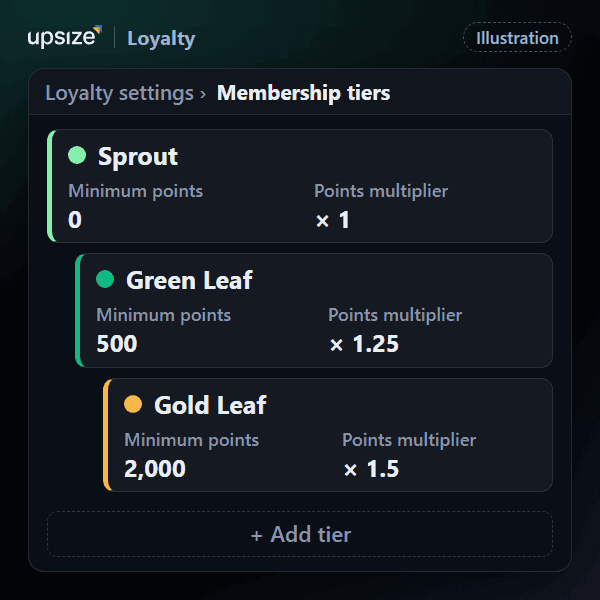
Each tier in the picture has its own minimum points, multiplier and colour. All values are examples.
Step 4Let customers see their own points
A customer portal where customers can check their own points and rewards cuts down on repeated questions at the counter, and keeps the programme on the customer's mind even when they are not at the shop. In the Upsize portal, customers see their membership card, redeem rewards, view My coupons and offers, look at their points history, and open their personal member QR code for staff to scan.
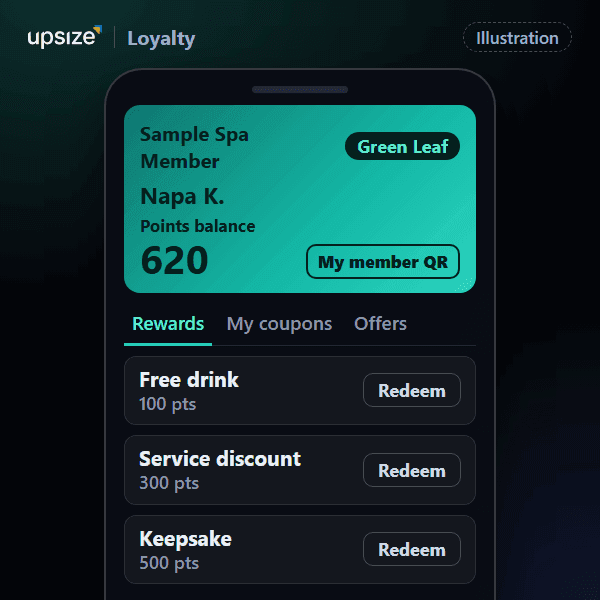
In the picture, a member sees their card, points balance and the rewards they can redeem.
Step 5Connect it to the rest of the customer's story
Loyalty data is most useful when it sits next to the other things you know. When Loyalty uses the same customer list as your CRM, chat and Booking, you can build on it right away, for example:
- In Upsize CRM, create an audience from membership tier, points range or members whose points are about to expire, then send a thank-you or invite-back campaign to exactly that group.
- On the customer detail page, a points tab lets your team see the history, and in the chat room they can see the customer's membership tier beside the conversation.
- A completed visit in Booking can earn a stamp on the stamp card automatically, so your team does not have to record it by hand.
Step 6Review the results and adjust
The Loyalty reports page summarises points issued, points redeemed, points expired, points returned or reversed, coupons issued and used, the number of members in each tier, and a breakdown by the branches linked to the programme. So you can see which branch issues the most points and which has customers who actually redeem. Use your own business's figures to adjust the rules, and do not compare with other shops' numbers, because every kind of business is different.
Common mistakes
- Separating programmes by branch without need. Customers have to collect again in several places, and their points are spread so thin they never reach a reward.
- Linking a branch to the wrong programme and only fixing it once there are many members. The existing points do not move with them.
- Rules that are too complicated, so that even the staff cannot explain them.
- A first reward that is out of reach, so customers never start collecting.
- No ceiling and no reason required for manual points adjustments, which makes it hard to audit later.
- Running the programme and never messaging members, even though the tier and points data is ready to use for grouping.
A simple way to start
- Decide first which branches will share, then link them to the same programme.
- Choose a way of collecting that you can explain in one sentence.
- Set a first reward that customers can reach.
- Open the portal so customers can check their own points, and teach staff how to scan member codes.
- Review the by-branch report from time to time and adjust the rules one at a time.
Upsize Loyalty offers points and stamps that work across branches, rewards and redemption, membership tiers and a customer portal, and works with the other Upsize apps under a single login.